NGINX Proxy Manager
NPM (NGINX Proxy Manager) runs on TrueNAS @ 192.168.2.203. It terminates HTTP on the LAN, maps hostnames to backend containers, and can issue Let's Encrypt certs for internal or legacy setups.
Post–Cloudflare Tunnel era, most public traffic hits *.saxobroko.com at the Cloudflare edge and tunnels straight to app ports. NPM is still useful but no longer the only front door.
Role today (tunnel era)
Before (CGNAT workaround):  Internet → Cloudflare DNS → NPM → app
Now (typical):              Internet → Cloudflare Tunnel → app (direct port or Docker hostname)
Still valid:                LAN client → NPM → pretty hostname / TLS / path rules → app
| NPM still helps with… | Tunnel-only is enough when… |
|---|---|
One LAN hostname for many backends (npm.lan → multiple proxy hosts) |
Each app has its own tunnel public hostname |
| WebSocket/path tweaks in one UI | App works with default tunnel → http://192.168.2.203:port |
| Local TLS (HTTPS on LAN without trusting raw ports) | You only need HTTPS on public URL (Cloudflare handles edge SSL) |
Legacy CNAME → local.saxobroko.com services |
Everything migrated to tunnel hostnames |
See Network for the current public URL list.
When to use NPM vs direct tunnel
Use Cloudflare Tunnel directly to the app when:
- Adding a new public subdomain (e.g.
newapp.saxobroko.com→http://192.168.2.203:8080) - WebSockets and headers work without extra proxy config
- You do not need path-based routing (
/api→ different container)
Put NPM in the path when:
- Tunnel points at NPM once (
http://192.168.2.203:81or container name) and NPM splits hostnames internally - You want consistent LAN URLs matching public names (same cert/hostname on
.lanor hosts file) - You need custom locations, large header buffers, or quick host changes without editing tunnel config
Current homelab trend: tunnels direct to services; NPM retained for LAN convenience and any hosts not yet migrated.
LAN admin access
NPM admin UI is LAN-first — do not expose the admin port to the public internet without Access/WAF.
- On home network (PC @
192.168.2.200or Wi‑Fi on192.168.2.0/24) - Open admin URL — historically
http://192.168.2.203:6081or port shown in TrueNAS Apps → NPM - Log in with credentials from Vaultwarden
From Windows, bookmark the LAN admin URL; no need to go through Cloudflare for day-to-day proxy edits.
Admin tasks
| Task | NPM section |
|---|---|
| Add internal site | Hosts → Proxy Hosts → Add |
| TLS for LAN hostname | SSL tab → Let's Encrypt or custom cert |
| Redirect HTTP → HTTPS | Proxy host SSL + force SSL |
| Default catch-all | Redirection Hosts or custom 404 host |
How to add a proxy host (LAN or legacy public)
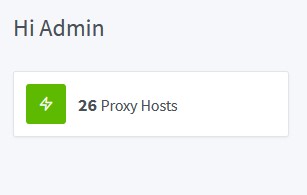
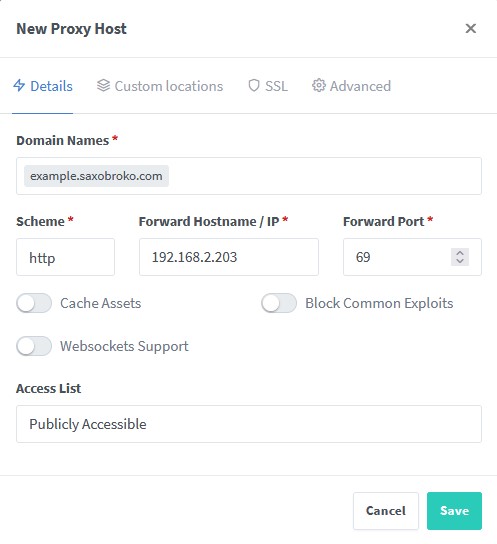
- Hosts → Proxy Hosts → Add Proxy Host
- Domain names — e.g.
jellyfin.lanor legacy public name - Forward hostname / IP — Docker service name on TrueNAS network or
192.168.2.203 - Forward port — app port (Jellyfin, Navidrome, etc.)
- Enable Block Common Exploits
- Enable Websockets Support for Jellyfin, Navidrome, Sonarr, Radarr, qBittorrent Web UI, etc.
- SSL — request cert if this hostname resolves to your LAN or tunnel terminates at NPM
For new public sites, prefer adding the hostname in Cloudflare Tunnel first — see Cloudflare and Network. Use NPM only if the tunnel targets NPM instead of the app.
Relationship to Cloudflare
| Piece | Role |
|---|---|
| Cloudflare DNS | *.saxobroko.com records |
| Cloudflare Tunnel | Inbound from internet without port forward (CGNAT) |
| NPM | Optional middle tier on LAN |
| WAF (block no aus) | Cloudflare edge — independent of NPM |
Tunnel config example (conceptual): stream.saxobroko.com → http://192.168.2.203:<jellyfin-port> or → http://npm:81 with NPM proxy host for that domain.
Document which hostnames still chain through NPM when you change tunnel entries.
Credentials and secrets
- NPM admin login → Vaultwarden
- Let's Encrypt email and DNS challenge tokens (if used) → env or Vaultwarden, not SaxDocs
Troubleshooting
| Symptom | Check |
|---|---|
| 502 Bad Gateway | Backend container down; wrong IP/port in proxy host |
| WebSocket fails (Jellyfin sync) | Websockets Support enabled on proxy host |
| Works on LAN, public broken | Tunnel hostname points to wrong port — fix in Cloudflare, not NPM |
| SSL errors on LAN | Cert domain mismatch; use LAN DNS name matching cert |
Related
- Network — tunnels and subdomains
- Cloudflare
- Services on TrueNAS
- Bitwarden